Nia has uploaded their whole Groovin' vhs to their blog!!!
Groovin ' 92 | Nia
ETA:
Monday 10/17
This morning I warmed up with a mile from Leslie's 4 Fast miles (MUsic only) mostly on the bungee.
The music and moves started feeling very repetitive so that revisit is probably over for awhile.
Then I did some of the rest of the first routine on MET-Rx Conditioning dvd 3 MUsic only. Unfortunately, it started freezing alot at about their 33 minute countdown. Not sure if it is the dvd or my player. Probably will not revisit this dvd again but I didn't mind some of the resistance moves and will just add a few new tweaks of theirs to future resistance moves.
Finished with the first 27 minutes of Nia's Awareness of Nerves and really liked it.
The warmup is all about the feet. I did the first 12 minutes on puzzle mats then the rest sitting on a stability ball.
Yesterday when trying to burn a dvdr with Freemake Video Converter, it kept stopping at the 82% encoding point so I converted the whole project to MP4, noting which files seemed to be at that point and replaced those previous files with the new MP4 files. Worked like a charm :) Guess one of those two files confused Freemake when converting to dvd format.
Also last night, our FIOS HD STB had its hic-cup again after playing fine for several hours, blinking to a blank screen for a second or two every 5 seconds or so. I believe the HD STB over-heats but it may have just been a temporary FIOS glitch. This happened one other time on 9/12 after a storm. Not sure what to do about it as long as it plays ok most other days.
ETA:
Darn it. It happened again so after jumping through hoops with the FIOS phone system, they are sending us a new HD STB to try.
ETA: Tuesday 10/8
This morning I really enjoyed everything I did.
First was the PrayFit Warmup with replaced audio/MUsic.
Then two routines from Fabulously Fit Moms
One was with a scarf and the other with a weighted ball.
I had replaced the audio/MUsic on those as well.
Cannot share any of the above publicly because of copyrights.
Last but not least, I did the first set of the first routine on the first Met-Rx Cardio dvd and really liked the choice of moves and number of reps up to the almost 15 minute mark when planks took over for the last 2 minutes of the set. The whole set is then repeated a second time before the stretch. I'll probably replaced the MUsic and trim the routine to its first 15 minutes up to the planks. The MUsic they used was ok just not as motivating for me as my own.
We are staying put waiting for our new HD STB from FIOS which is out on the UPS truck. The tracking info did not include our name and address so I am a bit worried about Murphy's Law. Hope it arrives today and during daylight so I can see what I am doing when connecting the wires.
So the new HD STB from FIOS arrived today and was working fine for a couple of hours then boom, the same problem again. Spoke to a FIOS tech who said it could be the HDMI cable or the HDMI port on the tv. So I switched in another HDMI wire which cost like $4 from Amazon and it played fine so far. Makes me mad because we bought a $20 GE HDMI cable at Walmart for our new and only HD tv because Walmart claimed they had problems with cheaper wires and FIOS stopped providing any because the ones they provided received complaints. Well it seems as though most failed HDMI cables have been GE!!!! Guess we were lucky it worked for 18 months.
ETA:
Wednesday 10/9
First I did the second Cardio Tactics routine on the Met-RX dvd9.
I was able to tweak the plank moves so even though they are more scattered than in the first routine, I liked the routine just as much as the first. Most moves are very bungee friendly. No Buyer's remorse.
Then I did the rest of Nia's Awareness of Nerves. Some I liked alot and some I will not revisit.
I will be adding MUsic to both Cardio Tactics. DVD Fab HD Decrypter copied the needed VTS files to a folder for me and Freemake Video Converter will be used for stripping the audio and trimming.
I prefer 15 minute routines so I did each the sets for the routines separately because they are tweaked a bit more in the second sets.
Showing posts with label Freemake Video Converter tips. Show all posts
Showing posts with label Freemake Video Converter tips. Show all posts
Sunday, October 6, 2013


Monday, April 29, 2013
Burning a DVD with Freemake Video Converter
Here is a screen shot of what the DVD output parameters can look like before clicking on *BURN*
You can edit the Title
Choose your menu type
Choose whether to burn a dvd (or a destination for an ISO image or VTS folder)
What the quality will be depending on the number of files, durations, and file sizes
I usually choose Good (green) or Standard (gold) and advise not to burn if the quality is Red.
If Red, you are trying to squeeze more on to the dvdr than what will play correctly.
Be sure it says NTSC if North America
I have MP2 as my audio default because otherwise there is no audio when the dvdr is played on a Play Station2 as a stand alone dvd player.

You can edit the Title
Choose your menu type
Choose whether to burn a dvd (or a destination for an ISO image or VTS folder)
What the quality will be depending on the number of files, durations, and file sizes
I usually choose Good (green) or Standard (gold) and advise not to burn if the quality is Red.
If Red, you are trying to squeeze more on to the dvdr than what will play correctly.
Be sure it says NTSC if North America
I have MP2 as my audio default because otherwise there is no audio when the dvdr is played on a Play Station2 as a stand alone dvd player.

Saturday, April 13, 2013
Grrrrrrrrrrrrrrrrrrrrrr
So I tried to burn a bunch of files with Freemake Video Converter, thinking my problem was solved because I did a successful burn after reinstalling it but it failed again. Also I am frustrated that Freemake will download many youtube videos but not all of them, including Jessica's latest Dance (Disco) Walk. I am going to bite the bullet and download their newest version with the ads. If it works better, I'll then uninstall the advertising extras. Otherwise will uninstall the whole program and go back to a previous version.
I did make a donation to Jessica's Living Room youtube channel and feel empathy for her because she is having technical problems herself and striving to please everyone. I only have to please myself.
ETA:
So I just downloaded and installed Freemake Video Converter from www.freemake.com
Now I am attempting a similar burn but I did convert the MP4 files to WMV because I may be using Windows DVD Maker if unsuccessful. Ironically, the software I had to accept was by Microsoft (Bing search engine and MS homepage) but the only change I saw so far is that VLC is my default player instead of Windows Media Player??
The other stuff may not show up till I reboot.
(note: I didn't accept the third party Shield software)
ETA: The dvdr seemed to have burned successfully.
BUT will not know if it can burn MP4 files like it used to till I try future burns.
BUT I can now download Jessica's Dance Walk from youtube with Freemake Video Converter!
Both problems solved :)
After avoiding to accept the search engine and home page changes from Microsoft with the newest Freemake Video Converter download, I have finally caved and found downloading and installing Freemake Video Converter 4.0 was a simple solution for all of my tech problems. However, I haven't installed any of the Gold Pack features which may or may not bring more advertising demands.
(note: maybe using Chrome as my browser avoided some advertising)
I did make a donation to Jessica's Living Room youtube channel and feel empathy for her because she is having technical problems herself and striving to please everyone. I only have to please myself.
ETA:
So I just downloaded and installed Freemake Video Converter from www.freemake.com
Now I am attempting a similar burn but I did convert the MP4 files to WMV because I may be using Windows DVD Maker if unsuccessful. Ironically, the software I had to accept was by Microsoft (Bing search engine and MS homepage) but the only change I saw so far is that VLC is my default player instead of Windows Media Player??
The other stuff may not show up till I reboot.
(note: I didn't accept the third party Shield software)
ETA: The dvdr seemed to have burned successfully.
BUT will not know if it can burn MP4 files like it used to till I try future burns.
BUT I can now download Jessica's Dance Walk from youtube with Freemake Video Converter!
Both problems solved :)
After avoiding to accept the search engine and home page changes from Microsoft with the newest Freemake Video Converter download, I have finally caved and found downloading and installing Freemake Video Converter 4.0 was a simple solution for all of my tech problems. However, I haven't installed any of the Gold Pack features which may or may not bring more advertising demands.
(note: maybe using Chrome as my browser avoided some advertising)
Wednesday, March 20, 2013
Ripping with Freemake Screen Shots and Handbrake Walkthru
Insert DVD to be ripped
Open Freemake Video Converter
Click on +DVD on the top of the screen

Highlight the Video TS folder on the dvd then click ok

Wait till Freemake opens the Title list
Then Check the Title(s) you want to Rip

then click ok and wait while Freemake loads the selected title

You can play the title to confirm it is the Title you wanted to rip
You can edit the Title's name which is in red
You can trim the Title video if you do not want the whole file
(see Trimming Tips link at bottom of this post)
However, the more you mess with the clip, the greater the risk Freemake may get confused and quit on you LOL
Better to edit the ripped file after completing the rip.
Click on the format on the bottom you want for the conversion
(I usually choose WMV or MP4 to play on Windows software)

(I usually choose TV or Mobile Quality)
you can choose where to save the file
Last Step: Click Convert
Done
Download Freemake Video Converter from
www.freemake.com
but carefully to avoid unwanted other free software.
Freemake products only work on Windows Operating systems.
Always choose custom option and uncheck all unwanted extras but keep the desktop icon if you like
ETA:
For another way to rip a dvd movie
http://neverendingplateau.blogspot.com/2015/01/ripping-vts-files.html
For Trimming tips
http://neverendingplateau.blogspot.com/2013/03/how-to-rip-and-trim-files-with-freemake.html
Quick Walkthru for ripping with Handbrake:
put in dvd
open Handbrake
click on *Source*s

choose dvd

wait while Handbrake scans the titles
choose a title # to rip

choose a destination file (Browse to choose the ripped title file location)

select MP4 under Output Settings

also edit the destination file format extension to (dot).mp4 if it reads (dot).m4v, especially if you want sites like Wellvideo to identify the video file as MP4
click the Green Start button
when done it will say *Queue Finished* on bottom of screen and Start button will be Green again
you can then select another title and so on

Download Handbrake directly from
http://handbrake.fr/downloads.php
for whatever operating system you are using
If you get a distorted video when trying to open it with Windows Media Player, it may be mkv format instead of MP4. Try playing it on the VLC media player instead.
http://www.videolan.org/vlc/
If Handbrake will not open the title you want, try using opening the File (VTS) instead of the DVD as your source. If still stubborn, use Shrink to produce the VTS files then use Handbrake on those VTS files. For more info: http://neverendingplateau.blogspot.com/2015/01/ripping-vts-files.html
Note: WellVideo sometimes does not accept MP4 files produced by Handbrake. Be sure you change the name of the file extension to (dot).mp4 if it reads (dot).m4v
Sunday, March 17, 2013
Youtube Tips from Freemake and Shockwave Flash Crashes
Wanted to share this article by Freemake which has tips on how to improve the playing of youtube videoes:
YouTube Doesn't Work! What to Do?
Downloaded files definitely play better than the streamed videos, especially if FIOS or youtube is having a bad day. I usually download a youtube video immediately with Freemake video Converter and am glad I do because for some reason the current Jessica Smith Ballet Body Sculpt is missing more of its top than it was immediately after being uploaded by Jessica. So I have the original download to work with rather than the one missing much of Jessica's head and even face.
Contrary to the article for myself, I found shockwave flash kept crashing on Chrome when enabling Chrome's Shockwave plug-in so disabled it and just enable the Windows Shockwave plug-in. Also found it best not to enable the Realplayer extensions or plug-ins to avoid Shockwave crashes on Chrome. For the Nia online class site, Freemake Video Downloader has been working just as well as Realplayer downloader used to work. It's alittle tricker because you have to play the video after pasting the url.
Even though the Freemake Video Converter installation now involves more accompanying advertising software, I still think it is the best program out there for any Windows operating system. If you love online or dvd videos and have a Windows operating system, it is definitely worth the fuss of uninstalling the unwanted advertising programs after their installation. There is no reason not to download and install Freemake Video Converter and every reason why to do so if you want to burn dvdrs. Its uses are endless. I am still finding new ways to use it. It burns dvdrs with hours and hours of footage. Up to 6 hours have been good quality and almost 11 hours at standard quality.
Though I add music mostly song by song with Windows Live Movie Maker, Freemake Video Converter can also replace soundtracks. If you like any of my soundtracks on my youtube videos, you can use Freemake video converter to just download the soundtrack by converting the video to a MP3 file. You can then replace the soundtrack of any video stored on your pc with this soundtrack as a single song using Freemake Video converter.
Note to my friends on FaceBook:
Please *like* my post about Freemake on FaceBook so I can possibly win a free key to their Gold features. Thanks!!
YouTube Doesn't Work! What to Do?
Downloaded files definitely play better than the streamed videos, especially if FIOS or youtube is having a bad day. I usually download a youtube video immediately with Freemake video Converter and am glad I do because for some reason the current Jessica Smith Ballet Body Sculpt is missing more of its top than it was immediately after being uploaded by Jessica. So I have the original download to work with rather than the one missing much of Jessica's head and even face.
Contrary to the article for myself, I found shockwave flash kept crashing on Chrome when enabling Chrome's Shockwave plug-in so disabled it and just enable the Windows Shockwave plug-in. Also found it best not to enable the Realplayer extensions or plug-ins to avoid Shockwave crashes on Chrome. For the Nia online class site, Freemake Video Downloader has been working just as well as Realplayer downloader used to work. It's alittle tricker because you have to play the video after pasting the url.
Even though the Freemake Video Converter installation now involves more accompanying advertising software, I still think it is the best program out there for any Windows operating system. If you love online or dvd videos and have a Windows operating system, it is definitely worth the fuss of uninstalling the unwanted advertising programs after their installation. There is no reason not to download and install Freemake Video Converter and every reason why to do so if you want to burn dvdrs. Its uses are endless. I am still finding new ways to use it. It burns dvdrs with hours and hours of footage. Up to 6 hours have been good quality and almost 11 hours at standard quality.
Though I add music mostly song by song with Windows Live Movie Maker, Freemake Video Converter can also replace soundtracks. If you like any of my soundtracks on my youtube videos, you can use Freemake video converter to just download the soundtrack by converting the video to a MP3 file. You can then replace the soundtrack of any video stored on your pc with this soundtrack as a single song using Freemake Video converter.
Note to my friends on FaceBook:
Please *like* my post about Freemake on FaceBook so I can possibly win a free key to their Gold features. Thanks!!
Thursday, March 7, 2013
How to Rip and Trim Files with Freemake
I have answered some questions on VF and in private messages of how to use Freemake Video Converter for ripping videos from a dvd and for trimming these videos so am going to try to put together all of the tips here.
One other thing to remember about Freemake Video converter,
sometimes you have to try more than once to open the dvd's titles, even on dvdrs burned by Freemake!
(good thing I'm stubborn and kept trying LOL)
See using Handbrake as another option for ripping at the bottom of this page.
sometimes you have to try more than once to open the dvd's titles, even on dvdrs burned by Freemake!
(good thing I'm stubborn and kept trying LOL)
See using Handbrake as another option for ripping at the bottom of this page.
There are two ways you can try to get just a selected chapter/title ripped from a dvd, depending on how your actual dvd will have the titles listed by Freemake.
First Way to rip a chapter/title:
Open Freemake Video Converter.
Put in dvd.
Click on *DVD* then the highlighted VideoTS which should appear.
If it doesn't, try to find the Video TS folder on the DVD.
(If it doesn't appear then you will have to do it the second way.)
click ok
Depending on your dvd's chaptering, Freemake will then open the dvd and list numbered individual titles and their duration. Freemake will have checked off for you what it determines to be the titles you may want, usually including the longest one for the whole movie and leave others you may actually want unchecked. Check the box in front of the ones you suspect may be the titles you want. Uncheck those you do not want.
If I am not sure which title I want, I list all of the ones I suspect may be the ones I want then just remove the extra titles I didn't want.
click ok
Now for each title, click play (green square around triangle) to play it to confirm it is the video(s) you want to rip. Keep the titles you want and edit each title's name. Remove from the list the other video titles you do not want to rip. You can also trim each title if you want to remove any parts before choosing to convert or burn. Trimming instructions are in red below. Remember if you do trim, to click OK in the lower right corner of the editing screen to save your edited version!
Second Way to rip a chapter/title:
If Freemake doesn't identify the chapters on the dvd as separate titles:
you can trim the movie down to the footage you want either from selecting just the long title or clicking on *Video* instead of *Dvd* and selecting the large vts/vob files directly from the dvd which you can trim while the video is on the play screen.
Trim off the beginning you do not want by inserting the end bracket ] where you want to cut then click the scissors icon to cut the selection. Cut off the end you do not want by inserting the beginning bracket [ at the start of the part you want removed and move the slider to the end of the video to insert the end bracket ] and click the scissors icon to cut the selection. To remove a center clip, put the beginning bracket [ at the beginning of the selection to be cut and the end bracket ] at the end of the selection then click on the scissors icon to cut the selection.
Sometimes the chapter you want is at the end of one VTS file and continues at the beginning of another. You then have to select and trim each file then choose to fuse the files before converting/burning.
Here's alittle video by Freemake to demonstrate cutting
http://www.freemake.com/how_to/how_to_cut_video_quickly
It isn't necessary to insert the [ at the beginning as they show just the ] where you want to start your video. Their technique is more for how to cut out a center part of the video.
Also they do not show how to trim off the end so just follow what I typed above LOL
Once you get the hang of it, it becomes really simple.
Remember you can convert, edit, and store the video files on your pc, waiting to burn several hours of them onto a single dvdr at another time.
I usually store in MP4 or WMV formats with TV or Mobile Quality and have burned 6 to 10 hours of footage into a single chaptered dvdr with standard quality. Also I suggest creating folders where you can easily find them for storing your downloads. You may want to remember to delete the downloads and stored files you no longer need while others you may want to keep to play on your pc.
Here's a link explaining how to rip with Freemake and Handbrake:
This article has a huge error. When ripping with Freemake choose *+DVD* not the *+Video*!
Then highlight your DVD's Video TS folder
Then highlight your DVD's Video TS folder
If you do not want to download the newest Freemake Video Converter version because you do not want to risk getting any other freeware offers, try Handbrake for ripping dvds.
You can still burn a dvd using MP4 files produced by Handbrake by opening the MP4 files with Windows Movie Maker then saving the movie to burn on dvd. Just takes much longer than Freemake to burn.
Download Handbrake directly from their official site
http://handbrake.fr/downloads.php
For a Screen Shot Walkthru on how to rip a dvd Title/Chapter
http://neverendingplateau.blogspot.com/2013/03/ripping-with-freemake-screen-shots.html*ETA: I recently downloaded Freemake Video Converter version 4.0.1.0 which was released 4/25, refusing all other offers and it works like a charm. You can easily remove any unnecessary extra freeware with malwarebytes downloaded for free from
http://www.malwarebytes.org/
Freemake still works great even after removing objects found and removed by malwarebytes
Monday, February 11, 2013
Freemake 101
Here's a quick Freemake Video Converter guide:
If you have a windows operating system you can download the
Freemake Video Converter
at www.freemake.com
or from a filemail where I uploaded the setup file:
https://www.filemail.com/dl.aspx?id=MCKNMXNOPBHBKMS
The download will try to get you to accept a couple of other software programs but just refuse the other software unless you want any of them. If you do download any by mistake or to try, you can uninstall/remove them whenever you want.
Freemake Video Converter can download a youtube video by copying the url and choosing to *paste the url*. It can then either convert the video(s) to store on you pc (I usually convert to wmv or MP4 because Windows friendly) or it can directly burn the downloads to a dvdr. I just finished burning over 5 hours of stored videos of mixed formats (wmv, mp4 and flv) to a single dvdr movie in about one hour .
It also enables trimming and ripping video titles from a dvd. It will also upload a video file to youtube, breaking it down into chapters shorter than 15 minutes.
If you want to download a video like the ones uploaded by Jessica Smith, convert it to MP4 and choose the audio to be mono instead of stereo to avoid the left speaker only audio.
ETA: if anyone wants to try Pump It Up
here's a filemail for that
https://www.filemail.com/dl.aspx?id=YDQSSSOBWPQXIMS
Friday, January 4, 2013
OMG!
I was reorganizing my pombarb youtube channel a bit, getting featured playlists and a featured video on the opening page and saw alittle green arrow in the right lower corner of the featured video and it opened Freemake Video Downloader! Didn't even know I had that simple option though I had downloaded the Freemake Video Downloader program awhile ago. I usually use Realplayer or copy the url to Freemake Video Converter *Paste a URL* for downloads.
Anywho I uploaded most of my Gin Miller Ramp workouts and may add another one and maybe a Leslie WalkBlaster. Leslie's Walkblaster is the same piece of equipment as Gin's Ramp. Both instructors had these workouts recorded on Good Times media. Good Times went bankrupt and Gaiam bought their content. I doubt Gaiam gives a darn about Ramp/Walkblaster workouts. One of the Good Times vhs I bought new for almost $20 and played only once or twice was already showing some deterioration. I do not understand how copyright laws created before vhs are still in play now that vhs are deteriorating. There is a *Fair Use* policy which has 4 different factors. I believe I am following 3 of the 4 and definitely the most important one of not interfering with the profits of the copyright owner. I think I could have contested Zumba's youtube strike against me. My one big factor I am violating is uploading more than a sample of a video but I am doing so more for preservation of the content and archiving than any other reason.
Love how some people expect me to upload stuff they can easily buy new online or offline at a brick and mortar store. No Way!!!! I am not jeopardizing my youtube account and committing copyright infringement to save people a few bucks.
Then there are those who complain about my MUsic. Adding MUsic was and is my main motivation for capturing video. Even most of the videos I add MUsic to can be found online in their original form. Most are pretty darn cheap in *Used* condition on Amazon. Much cheaper than I paid when *New* in most cases.
Yes, I can offer some variety to Vidiots so they can save some money as well as discover new ways to move BUT Vidiots still need to support their favorite instructors and vendors.
I am a People Pleaser but have to set some limits.
ETA:
This mornings' workout
Anywho I uploaded most of my Gin Miller Ramp workouts and may add another one and maybe a Leslie WalkBlaster. Leslie's Walkblaster is the same piece of equipment as Gin's Ramp. Both instructors had these workouts recorded on Good Times media. Good Times went bankrupt and Gaiam bought their content. I doubt Gaiam gives a darn about Ramp/Walkblaster workouts. One of the Good Times vhs I bought new for almost $20 and played only once or twice was already showing some deterioration. I do not understand how copyright laws created before vhs are still in play now that vhs are deteriorating. There is a *Fair Use* policy which has 4 different factors. I believe I am following 3 of the 4 and definitely the most important one of not interfering with the profits of the copyright owner. I think I could have contested Zumba's youtube strike against me. My one big factor I am violating is uploading more than a sample of a video but I am doing so more for preservation of the content and archiving than any other reason.
Love how some people expect me to upload stuff they can easily buy new online or offline at a brick and mortar store. No Way!!!! I am not jeopardizing my youtube account and committing copyright infringement to save people a few bucks.
Then there are those who complain about my MUsic. Adding MUsic was and is my main motivation for capturing video. Even most of the videos I add MUsic to can be found online in their original form. Most are pretty darn cheap in *Used* condition on Amazon. Much cheaper than I paid when *New* in most cases.
Yes, I can offer some variety to Vidiots so they can save some money as well as discover new ways to move BUT Vidiots still need to support their favorite instructors and vendors.
I am a People Pleaser but have to set some limits.
ETA:
This mornings' workout
Sunday, December 23, 2012
Adding MUsic
So many workouts with boring music and/or annoying chatter are greatly improved when adding music.
I wish I could say adding music is simple but I use Windows Movie Maker to add the songs and it can be tricky. Not only can I add as many songs as I want but I can choose where to begin the next song.
Freemake Video Converter will add only one song at a time.
A simple solution would be to rip a whole soundtrack you like from a whole youtube video with Freemake by converting the download to MP3 then using that whole MP3 file as your audio on another video.
(If you download Freemake Video Converter from www.freemake.com
you can refuse the extra software programs in the download by unchecking their boxes.)
If there is a song you do not like, you can download the video, trim the video to remove the song then convert the video to MP3.
Also you can remove the previous audio from a video file by choosing *no audio* from the audio drop down menu if you want to completely remove the chatter before adding your own music.
An even simpler trick, if you are actually workingout to a streamed video or dvdr, just mute it and play your own music while working out.
I wish I could say adding music is simple but I use Windows Movie Maker to add the songs and it can be tricky. Not only can I add as many songs as I want but I can choose where to begin the next song.
Freemake Video Converter will add only one song at a time.
A simple solution would be to rip a whole soundtrack you like from a whole youtube video with Freemake by converting the download to MP3 then using that whole MP3 file as your audio on another video.
(If you download Freemake Video Converter from www.freemake.com
you can refuse the extra software programs in the download by unchecking their boxes.)
If there is a song you do not like, you can download the video, trim the video to remove the song then convert the video to MP3.
Also you can remove the previous audio from a video file by choosing *no audio* from the audio drop down menu if you want to completely remove the chatter before adding your own music.
An even simpler trick, if you are actually workingout to a streamed video or dvdr, just mute it and play your own music while working out.
Saturday, November 10, 2012
Freemake Audio Tip

In this picture, change the drop down menu for audio in the lower right corner to MP2 when burning a dvdr.
By doing this, you may hear the audio that seems to be missing like my audio was missing when using a Play Station2 as a dvd player. I use the MP2 choice as my output audio for all conversions and dvdr burns.
Saturday, October 20, 2012
Another great combo thanks to Freemake
This morning I warmed up on the bungee to some of Kathy Smith's Rejuvenation Walk to which I added music. Again adding music pumped new life into an old routine.
Then I finished Unplugged and really enjoyed the cooldown. Chaptering Unplugged made a real difference for its revisit.
Next I revisited the rest of MeltItOff Progressive Strength's upright segment and some of the MeltItOff Core standing ab but used a weightless chiball because the 2 lb smartbell aggravated my shoulder during a previous revisit.
Finished with some CS barre.
I used Freemake Video Converter for ripping titles from dvd, trimming them into chapters, removing audio from clips that I want to add music to, and/or to rip a routine that I want to save on my hard drive like the Unplugged Cooldown.
Thanks to Freemake, I am also trimming videos I want to load to FIOS to play on our hdtv because Verizon Media Manager will only sync clips under 10 minutes.
Then I finished Unplugged and really enjoyed the cooldown. Chaptering Unplugged made a real difference for its revisit.
Next I revisited the rest of MeltItOff Progressive Strength's upright segment and some of the MeltItOff Core standing ab but used a weightless chiball because the 2 lb smartbell aggravated my shoulder during a previous revisit.
Finished with some CS barre.
I used Freemake Video Converter for ripping titles from dvd, trimming them into chapters, removing audio from clips that I want to add music to, and/or to rip a routine that I want to save on my hard drive like the Unplugged Cooldown.
Thanks to Freemake, I am also trimming videos I want to load to FIOS to play on our hdtv because Verizon Media Manager will only sync clips under 10 minutes.
Monday, October 15, 2012
How to download and add music to a video file
I prefer to download/convert/edit/burn with Freemake Video Converter using a Windows operating system.
Downloading:
If the video site is not compatible with Freemake Video Converter, I use Freemake Video Downloader.
If the video is not compatible with either Freemake product, I use Download Helper on the Firefox browser.
When downloading any Freemake product from
www.freemake.com
I do not recommend getting the toolbar or any other extra software offered with Freemake products which you can avoid by choosing to customize the download and installation. Be very careful which boxes are checked or unchecked.
Freemake can download youtube files and burn the files into a movie file onto a dvdr in a single swoop but I store these video files on my hard drive in MP4 format till I have a couple of hours to burn onto a single dvdr with Freemake. Sometimes I edit these files and/or add music.
If I want to add my own music, I can choose *no Audio* when converting the file to make a muted MP4 file or I can add one long soundtrack using the dropdown audio menu.
If I have a soundtrack available (several songs already joined into one MP3 file), I can add that file to replace the original audio instead of muting the original.
 (if ripping a DVD with more than one soundtrack or language, this audio dropdown menu may offer those additional options)
Sometimes before converting I trim out parts I do not want to do and/or break long videos into smaller segments or chapters, each saved separately
For music, I rip cds and more recently, online video files (youtube, amazon freebies, etc.).
RunHundred makes excellent song suggestions
http://www.runhundred.com/
Youtube has a zillion videos with music.
I just download with Freemake Video Converter by *Pasting the url* of the song on youtube as the source then convert to MP3.
To add music to muted video files, I use Windows Live Movie Maker.
I could add the music with Freemake but would be limited to one MP3 file. Plus it is easier to find the exact spot to change the song on Windows Live Movie Maker. I save the movie for email which makes the file smaller cuz visual quality isn't worth more space to me.
You can also edit a video file on a dvd workout in the same way, ripping the video from the dvdr with Freemake. Use the DVD as your source. Freemake will give you a choice of titles to play, trim and convert.
ETA: when downloading and converting video files, make new folders as needed so you can find the files and delete files you no longer need.
For more tips, check the labels for Freemake Video Converter Tips or Freemake links
ETA:
To add MUsic while keeping the original cuing voice, do not mute the video before adding music with Windows Live Movie Maker. If the original music is soft, you should hear just the cuing with your new music. You can adjust the volume of the music files you are using with MP3Gain.
http://mp3gain.sourceforge.net/
Here's a brief walk through for adding music with Windows Live Movie Maker:
http://neverendingplateau.blogspot.com/2014/09/adding-music-with-windows-live-movie.html
Downloading:
If the video site is not compatible with Freemake Video Converter, I use Freemake Video Downloader.
If the video is not compatible with either Freemake product, I use Download Helper on the Firefox browser.
When downloading any Freemake product from
www.freemake.com
I do not recommend getting the toolbar or any other extra software offered with Freemake products which you can avoid by choosing to customize the download and installation. Be very careful which boxes are checked or unchecked.
Freemake can download youtube files and burn the files into a movie file onto a dvdr in a single swoop but I store these video files on my hard drive in MP4 format till I have a couple of hours to burn onto a single dvdr with Freemake. Sometimes I edit these files and/or add music.
If I want to add my own music, I can choose *no Audio* when converting the file to make a muted MP4 file or I can add one long soundtrack using the dropdown audio menu.
If I have a soundtrack available (several songs already joined into one MP3 file), I can add that file to replace the original audio instead of muting the original.
Sometimes before converting I trim out parts I do not want to do and/or break long videos into smaller segments or chapters, each saved separately
For music, I rip cds and more recently, online video files (youtube, amazon freebies, etc.).
RunHundred makes excellent song suggestions
http://www.runhundred.com/
Youtube has a zillion videos with music.
I just download with Freemake Video Converter by *Pasting the url* of the song on youtube as the source then convert to MP3.
To add music to muted video files, I use Windows Live Movie Maker.
I could add the music with Freemake but would be limited to one MP3 file. Plus it is easier to find the exact spot to change the song on Windows Live Movie Maker. I save the movie for email which makes the file smaller cuz visual quality isn't worth more space to me.
You can also edit a video file on a dvd workout in the same way, ripping the video from the dvdr with Freemake. Use the DVD as your source. Freemake will give you a choice of titles to play, trim and convert.
ETA: when downloading and converting video files, make new folders as needed so you can find the files and delete files you no longer need.
For more tips, check the labels for Freemake Video Converter Tips or Freemake links
ETA:
To add MUsic while keeping the original cuing voice, do not mute the video before adding music with Windows Live Movie Maker. If the original music is soft, you should hear just the cuing with your new music. You can adjust the volume of the music files you are using with MP3Gain.
http://mp3gain.sourceforge.net/
Here's a brief walk through for adding music with Windows Live Movie Maker:
http://neverendingplateau.blogspot.com/2014/09/adding-music-with-windows-live-movie.html
Saturday, September 29, 2012
Realplayer Downloading, etc.
Some video sites do not enable Freemake Video Converter to download and I like to use Realplayer to download clips because it is the simplest to use
.....when it works.
Previously, when Realplayer stopped downloading, I found an easy fix to uncheck the hardware accelerator under settings when right clicking a video.
Well that fix didn't work today so I jumped through a bunch of hoops to update Realplayer and my Chrome add-on preferences and finally something I did worked and I can download with Realplayer again. PHEW
Also updated the Freemake Video Converter, hoping it will download from sites that the previous version couldn't. Again I did a custom download to avoid the toolbar and another program they were offering.
I am in shock that hardly anyone downloaded from my most recent filemail links with music added to some Jessica Smith youtube videos.
Guess it isn't worth the effort to share as much in the future.
.....when it works.
Previously, when Realplayer stopped downloading, I found an easy fix to uncheck the hardware accelerator under settings when right clicking a video.
Well that fix didn't work today so I jumped through a bunch of hoops to update Realplayer and my Chrome add-on preferences and finally something I did worked and I can download with Realplayer again. PHEW
Also updated the Freemake Video Converter, hoping it will download from sites that the previous version couldn't. Again I did a custom download to avoid the toolbar and another program they were offering.
I am in shock that hardly anyone downloaded from my most recent filemail links with music added to some Jessica Smith youtube videos.
Guess it isn't worth the effort to share as much in the future.
Tuesday, September 25, 2012
Chaptering and editing music
I wanted to share how I have been doing what I have been doing LOL
For chaptering, Freemake Video Converter and/or Windows Live Movie Maker.
I just open the whole movie and trim parts I do not want and save the shorter video as a chapter.
For sound editing, I convert a video file to wmv without audio then add the audio with Windows Live Movie Maker.
I can rip the music from video files using Freemake.
Click on Audio as the source then the video file (need *all files* chosen in the drop down menu) then convert to MP3.
As I create more music mixes, I will be adding video files to the older filemail links.
Tonight I added 2 more to Jessica Smith's list and another Leslie Blue Mile.
ETA: Freemake Video Converter can rip the whole video file off of a dvd as well as those stored on your hard drive (or whatever storage device you use). When the source is a dvd, you may have to open and play the dvd on the pc first for Freemake to then be able to open the files on your DVD drive.
I can also add audio with Freemake but find Windows Movie Maker easier when adding more than one song track.
Friday, September 21, 2012
Hello Dana :)
This morning I warmed up on the bungee to Leslie's Green mile which was ok but not as much fun as the Blue mile. Then I did Dana Pieper's Kickbox warmup on the bungee, followed by her punching with weights AWT but I used homemade XCOs and really liked Dana, the routine and the music. Dana's dvds lack chaptering so I chaptered them myself with Freemake Video Converter :)
Finished with CS 728.
ETA:
Another Freemake tip ....
When Freemake Video Converter crashes, try restarting your pc before attempting to do the task again. (actually this is a good tip when any application crashes).
Finished with CS 728.
ETA:
Another Freemake tip ....
When Freemake Video Converter crashes, try restarting your pc before attempting to do the task again. (actually this is a good tip when any application crashes).
Sunday, July 15, 2012
Barefoot Dancer Filemail
I am in the process of uploading the Barefoot Dancer TV episodes to filemail again for those who missed the previous filemail of them. Come back to this post for the link which I will post below.
Fastest way to download all of the of the files is to choose the zip file.
Again, the easiest and fastest way to burn dvdrs of the files on a pc is with Freemake Video Converter which is available free at www.freemake.com
(mac users may have to use another software)
For more tips, check the labels for Barefoot Dancer, filemail, filemail links, Freemake Video Converter and Freemake Video Converter tips.
After taking over 3 hours to upload, here's the filemail link for the Barefoot Dancer TV episodes:
https://www.filemail.com/dl.aspx?id=AGXZQRPWYOHRHKN
Luckily downloading is much faster than uploading!
Fastest way to download all of the of the files is to choose the zip file.
Again, the easiest and fastest way to burn dvdrs of the files on a pc is with Freemake Video Converter which is available free at www.freemake.com
(mac users may have to use another software)
For more tips, check the labels for Barefoot Dancer, filemail, filemail links, Freemake Video Converter and Freemake Video Converter tips.
After taking over 3 hours to upload, here's the filemail link for the Barefoot Dancer TV episodes:
https://www.filemail.com/dl.aspx?id=AGXZQRPWYOHRHKN
Luckily downloading is much faster than uploading!
Friday, June 1, 2012
Still Loving ReFitRev
This morning I warmed up on the bungee to the RevFitRev file I called
*Purples Tonight NT Firestarter Embute HisGlory.wmv*
on the filemail link
https://www.filemail.com/dl.aspx?id=QYGYUOPCITXTCFA
which expires 6/4.
Will try to embed the files below later today.
Then I did Grace & Gusto starting with the chair chapter up to the Giddyups.
Then I did about half of *House Your Body* from Rockin Body with Fitstix.
Tonight:
NT:
Firestarter:
Embute:
His Glory:
Note: If you have RealPlayer, you can download these videos and other videos right from my blog (or youtube) onto your hard drive. Then you can use Freemake Video Converter to burn the flv files to dvdr if you have a Windows PC.
Or you can use Freemake Video Converter to download them by right clicking the mouse on the video and choosing to copy the url then pasting the url onto Freemake. You can save the files in whatever format you want on your hard drive, etc. or burn them directly to dvdr with Freemake Video Converter. Best have a good hour or two of videos ready to burn before burning if you do not want to use too many blank dvdrs. Freemake Video Converter is much easier to use and faster than Windows DVD Maker. If using Windows DVD Maker you have to have the files converted to a format accepted by Windows DVD Maker like wmv,mpeg, etc. if you want the dvdr to play on most dvd players. Either RealPlayer or Freemake Video Converter can do the conversions. Occasionally, I still have to settle for Windows DVD Maker when Freemake crashes.
*Purples Tonight NT Firestarter Embute HisGlory.wmv*
on the filemail link
https://www.filemail.com/dl.aspx?id=QYGYUOPCITXTCFA
which expires 6/4.
Will try to embed the files below later today.
Then I did Grace & Gusto starting with the chair chapter up to the Giddyups.
Then I did about half of *House Your Body* from Rockin Body with Fitstix.
Tonight:
NT:
Firestarter:
Embute:
His Glory:
Note: If you have RealPlayer, you can download these videos and other videos right from my blog (or youtube) onto your hard drive. Then you can use Freemake Video Converter to burn the flv files to dvdr if you have a Windows PC.
Or you can use Freemake Video Converter to download them by right clicking the mouse on the video and choosing to copy the url then pasting the url onto Freemake. You can save the files in whatever format you want on your hard drive, etc. or burn them directly to dvdr with Freemake Video Converter. Best have a good hour or two of videos ready to burn before burning if you do not want to use too many blank dvdrs. Freemake Video Converter is much easier to use and faster than Windows DVD Maker. If using Windows DVD Maker you have to have the files converted to a format accepted by Windows DVD Maker like wmv,mpeg, etc. if you want the dvdr to play on most dvd players. Either RealPlayer or Freemake Video Converter can do the conversions. Occasionally, I still have to settle for Windows DVD Maker when Freemake crashes.
Sunday, May 13, 2012
Happy Mother's Day and online workouts
Mother's Day to me is mostly significant because exercise helped me through a miserable depression after seeing a TaeBo infomercial on Mother's Day 13 years ago. Exercise has helped me shift my focus from being a Mother to taking care of myself.
If anyone is interested in any of the online workouts I have been using and would like a filemail.com link to any of them, send a request to horsemom2@aol.com
You can even try sending occassional filemails up to 2 gigs for free with filemail. Filemail has given me a free premium account for mentioning them on my blog and I love to share.
Again if you have a pc and not a mac, Freemake Video Converter makes burning dvdrs a breeze, available at www.freemake.com
It also downloads youtube clips, converts from and to all formats (even vts files on a dvd) and can be used as a media player and editor.
I found filemail.com and Freemake Video converter looking for easy and free ways to share and both providers have been wonderful.
If anyone comes across youtube or vimeo workouts worth sharing, please let me know!!!
ETA:
This morning I warmed up with Bollywood type dance on the bungee then tried a bunch of new workouts: Gilad's Max Abs, Cardio Karate Cardio circuits and some of sequence 2 from Liquid Grooves. Really liked all of the above. If Max Abs had better music, it would easily be the only medball workout I would do. Lurve the slow powerful movements in Cardio Circuits which has a different feel than any other workout. Surprisingly, the TIFTT (Taking It From The Top) doesn't bother me at all in Liquid Grooves. The Bollywood Dance youtube clips were great on the bungee!! I had fused two different instructors. Here's the MP4 filemail link still active till 5/22:
https://www.filemail.com/dl.aspx?id=AAOVQTLUPZBHLJI
Here's the wmv link available till 5/28:
https://www.filemail.com/dl.aspx?id=WOZQMKBNRCUYCFA
MP4 may be preferred on macs
wmv may be preferred on windows pcs
If anyone is interested in any of the online workouts I have been using and would like a filemail.com link to any of them, send a request to horsemom2@aol.com
You can even try sending occassional filemails up to 2 gigs for free with filemail. Filemail has given me a free premium account for mentioning them on my blog and I love to share.
Again if you have a pc and not a mac, Freemake Video Converter makes burning dvdrs a breeze, available at www.freemake.com
It also downloads youtube clips, converts from and to all formats (even vts files on a dvd) and can be used as a media player and editor.
I found filemail.com and Freemake Video converter looking for easy and free ways to share and both providers have been wonderful.
If anyone comes across youtube or vimeo workouts worth sharing, please let me know!!!
ETA:
This morning I warmed up with Bollywood type dance on the bungee then tried a bunch of new workouts: Gilad's Max Abs, Cardio Karate Cardio circuits and some of sequence 2 from Liquid Grooves. Really liked all of the above. If Max Abs had better music, it would easily be the only medball workout I would do. Lurve the slow powerful movements in Cardio Circuits which has a different feel than any other workout. Surprisingly, the TIFTT (Taking It From The Top) doesn't bother me at all in Liquid Grooves. The Bollywood Dance youtube clips were great on the bungee!! I had fused two different instructors. Here's the MP4 filemail link still active till 5/22:
https://www.filemail.com/dl.aspx?id=AAOVQTLUPZBHLJI
Here's the wmv link available till 5/28:
https://www.filemail.com/dl.aspx?id=WOZQMKBNRCUYCFA
MP4 may be preferred on macs
wmv may be preferred on windows pcs
Thursday, April 26, 2012
Nia Kinetic video & another Filemail offer
I found this nice Nia spark through the Nia newsletter and wanted to share it while I still can before Blogger forces me into their new interface:
Here is its link on youtube
http://www.youtube.com/watch?v=shSIw1DTP_M
also found a whole bunch of Nia clips at
http://www.youtube.com/user/hollyjcurtis?feature=watch
I uploaded some of the above to filemail for those who are interested in trying them:
https://www.filemail.com/dl.aspx?id=ERJQLUQMHVKNLJI
is for 8 files in MP4 format
https://www.filemail.com/dl.aspx?id=RWTXVRZYXYBANST
is for the 8 files in wmv format
Some may prefer wmv files to MP4 to use Windows DVD Maker for burning the video files on to a dvdr because it is already on most pcs with Windows7. Freemake Video Converter will burn any kind of video file on to a dvdr on a pc and is available at www.freemake.com for free.
The other option is to load the MP4s on to Windows Movie Maker then save the movie to dvd but that would merge the 8 files into one movie unless each file were saved separately before burning. I haven't a clue what kind of files would be best when burning a dvd on a Mac if anyone wants to enlighten me? I think the MP4 files are more Mac friendly.
For more info, check my Freemake Video Converter and Freemake Video Converter tips links.
some helpful posts may be
http://neverendingplateau.blogspot.com/search/label/Freemake
http://neverendingplateau.blogspot.com/2012/01/freemake-directions.html
Here is its link on youtube
http://www.youtube.com/watch?v=shSIw1DTP_M
also found a whole bunch of Nia clips at
http://www.youtube.com/user/hollyjcurtis?feature=watch
I uploaded some of the above to filemail for those who are interested in trying them:
https://www.filemail.com/dl.aspx?id=ERJQLUQMHVKNLJI
is for 8 files in MP4 format
https://www.filemail.com/dl.aspx?id=RWTXVRZYXYBANST
is for the 8 files in wmv format
Some may prefer wmv files to MP4 to use Windows DVD Maker for burning the video files on to a dvdr because it is already on most pcs with Windows7. Freemake Video Converter will burn any kind of video file on to a dvdr on a pc and is available at www.freemake.com for free.
The other option is to load the MP4s on to Windows Movie Maker then save the movie to dvd but that would merge the 8 files into one movie unless each file were saved separately before burning. I haven't a clue what kind of files would be best when burning a dvd on a Mac if anyone wants to enlighten me? I think the MP4 files are more Mac friendly.
For more info, check my Freemake Video Converter and Freemake Video Converter tips links.
some helpful posts may be
http://neverendingplateau.blogspot.com/search/label/Freemake
http://neverendingplateau.blogspot.com/2012/01/freemake-directions.html
Friday, March 9, 2012
Freemake Video Converter tips
Somebody was confused where a converted to MP4 file was after converting a download so I tried to explain where the file could have gone below. I added in each step taken to convert an online video to MP4 using Freemake Video Converter.
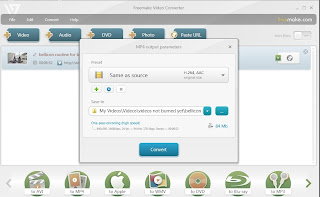
Above is an image I captured which shows what I see when converting a file found online to a MP4 file using Freemake Video Converter. To paste the url, highlight the url of the video and copy it (right click the mouse on the url and click on copy) then click on *paste url*. Just make sure you wait to copy the url for the video you want when it is actually playing, not its preceding advertisement's url. Freemake Video Converter will then list the video. After listing all of the video files you want, click on *to MP4* on the bottom of the screen if you want to download and convert these videos to MP4.
My *save to* folder defaults to the last folder I used for such a task unless I choose a different folder either with the *blue drop down icon button* or the *blue ... icon button* to find another location. I usually create a new folder for each type of download under *My Videos*.
Here is another image which hopefully shows the *save to* part of the screen and its options better:
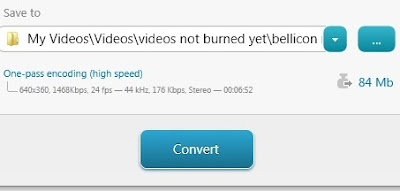
Once the location is chosen for the converted file(s), click on *Convert*.
If you rather burn the video file(s) directly to a dvdr, you can click on *to DVD* instead of *to MP4*. For my own needs, I usually download the videos converted to WMV and eventually burn them to dvdr when I have almost 150 minutes of footage.
Videos on your hard drive or on dvds can also be converted or burned.
You can also play or even trim the video on Freemake before converting or burning.
Freemake Video Converter is a free software program and can be downloaded at www.freemake.com
For more Freemake Video Converter tips on this blog, click on the Freemake Video Converter label. This software was released in December 2011 so it is a very new development and really has been the easiest and most reliable I have tried. Best of all, it is FREE!
Occasionally, I still use RealPlayer to download videos because it is very convenient, especially when I do not want to waste time converting the files and RealPlayer seems to download some files that Freemake cannot yet access. I can then convert or burn the RealPlayer downloads at my convenience with Freemake Video Converter. RealPlayer may also be an option for Mac users since Freemake software is available just for Windows.

Above is an image I captured which shows what I see when converting a file found online to a MP4 file using Freemake Video Converter. To paste the url, highlight the url of the video and copy it (right click the mouse on the url and click on copy) then click on *paste url*. Just make sure you wait to copy the url for the video you want when it is actually playing, not its preceding advertisement's url. Freemake Video Converter will then list the video. After listing all of the video files you want, click on *to MP4* on the bottom of the screen if you want to download and convert these videos to MP4.
My *save to* folder defaults to the last folder I used for such a task unless I choose a different folder either with the *blue drop down icon button* or the *blue ... icon button* to find another location. I usually create a new folder for each type of download under *My Videos*.
Here is another image which hopefully shows the *save to* part of the screen and its options better:

Once the location is chosen for the converted file(s), click on *Convert*.
If you rather burn the video file(s) directly to a dvdr, you can click on *to DVD* instead of *to MP4*. For my own needs, I usually download the videos converted to WMV and eventually burn them to dvdr when I have almost 150 minutes of footage.
Videos on your hard drive or on dvds can also be converted or burned.
You can also play or even trim the video on Freemake before converting or burning.
Freemake Video Converter is a free software program and can be downloaded at www.freemake.com
For more Freemake Video Converter tips on this blog, click on the Freemake Video Converter label. This software was released in December 2011 so it is a very new development and really has been the easiest and most reliable I have tried. Best of all, it is FREE!
Occasionally, I still use RealPlayer to download videos because it is very convenient, especially when I do not want to waste time converting the files and RealPlayer seems to download some files that Freemake cannot yet access. I can then convert or burn the RealPlayer downloads at my convenience with Freemake Video Converter. RealPlayer may also be an option for Mac users since Freemake software is available just for Windows.
Subscribe to:
Posts (Atom)


